

Project Overview
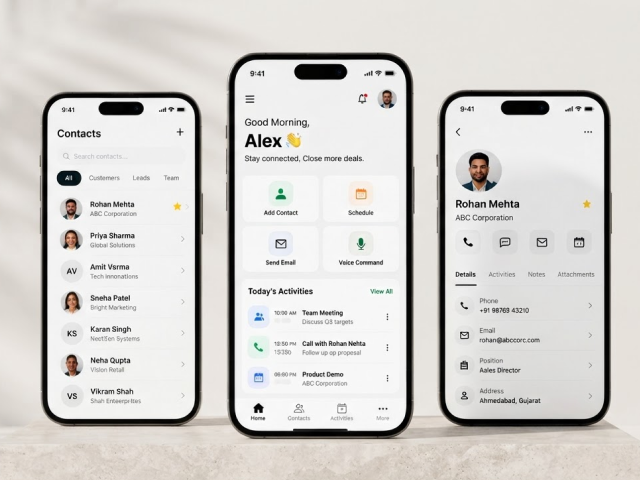
The Online CRM Application is a customized mobile CRM and marketing assistant designed to help sales professionals manage customer relationships and daily marketing activities from a single iOS application.
This application integrates various functions like contact management, event scheduling, notes, emails/SMS, reminders, attachments, and voice command functionalities into one application. The user imports the contacts once, but the application ensures that the newly added contacts get synced automatically, which keeps all the customer data updated. This application is designed for professionals who require an effective tool for customer interaction management and saves time in toggling among different applications.
Project Objectives
- Easier handling of customers and contacts.
- Centralize the mobile CRM system for salespeople.
- Save time during routine CRM tasks.
- Automate the synchronization process after importing contacts.
- Allow users to manage events, notes, and reminders through one application.
- Offer direct emailing and messaging capabilities to contacts.
- Increase efficiency using voice commands.
- Manage information about customers through one application.
Let's Shape Your Project Together
Have an idea, a challenge, or a new project in mind? Our team is here to help.
Business Challenges
1. Time-Consuming Processes of Working with CRM
The use of old CRM systems often takes several steps to perform actions such as taking notes, scheduling activities, and communicating with customers. It is not convenient for salespeople and marketers.
2. Dispersed Customer Information
Contacts, notes, events, and communication become scattered between different applications, and it becomes hard to see the whole picture of customer interaction.
3. Manual Contact Importing and Updating
Such an activity takes much time and leads to incorrect customer information.
4. Lack of Productivity on the Go
Salespeople usually work off the desk and they need all necessary information about their customers on the move, via their phones.
5. Difficulties with Follow-Ups Management
The absence of centralized management of events, activities, and customer communication can lead to the loss of important meetings and follow-ups.
6. The Need for Fast Actions
It is very important for salespeople to perform such routine actions quickly. Voice commands can simplify this process significantly.
Our Solutions
In order to deal with these issues, we designed a bespoke iOS CRM system that combines all critical customer relations and marketing functions in a single mobile app. The system offers centralized contact management, synchronization, event and note management, direct communication, reminders, attachment features, and voice commands. It provides users with a convenient mobile CRM tool for carrying out their sales and marketing activities on a daily basis.
Centralized Contact Management
With the help of the system, users can import their existing contacts just once and then automatically synchronize any new contacts they add to their database.
Simplified Event & Note Management
Users can create and manage both events and notes using the application. In addition, attachments can be created for notes and events; thus, users will have the ability to store information related to their customers along with the particular activity.
Customer Communication
Users are enabled to send e-mails and text messages directly to their contacts; hence, switching between applications while communicating with customers will not be necessary anymore.
Voice Commands for Increased Productivity
With the help of voice commands, users can carry out supported CRM tasks faster and easier.
Key Benefits
- Centralization of contacts and customers
- Automation of contact synchronization
- Organization of events and calendars
- Note-taking and attachment organization
- Sending emails and SMS through CRM
- Reminders for critical tasks
- Increase in mobile productivity through voice commands
- Decrease in tedious tasks in CRM
- CRM features for sales personnel on the go
Key Features
Contact Management
Import existing contacts through a one-time process and keep contact information synchronized as new contacts are added.
Event Management
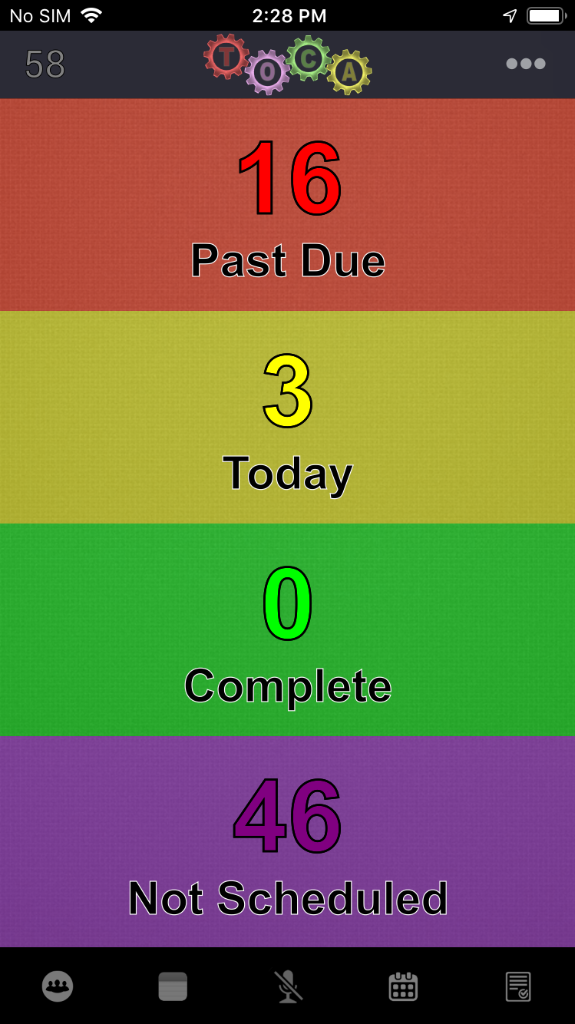
Create, manage, and track customer-related events and activities through the mobile calendar.
Notes Management
Create and manage notes for contacts while attaching relevant files or documents.
Voice Commands
Use supported voice commands to perform common CRM tasks and improve hands-free productivity.
Email Communication
Send emails directly to contacts from within the application.
SMS Communication
Send text messages to customers and contacts without leaving the CRM application.
Notifications & Reminders
Receive notifications and reminders for scheduled events, notes, and other important activities.
Attachment Management
Add and manage attachments associated with events and notes to keep supporting information organized.
Contact Synchronization
Automatically synchronize newly added contacts after the initial contact import process.
Technology
| Mobile Platform | iOS |
| Frontend / Mobile Development | Swift |
| Database | SQLite |
| Development Tools | Xcode |
| Architecture | Mobile CRM Application |
Business Results
30%
Faster CRM Task Management
Centralized CRM functionality helped users complete routine activities such as contact management, notes, events, and communication with fewer steps.
40%
Improved Customer Information Accessibility
A unified mobile platform made customer contacts, notes, events, and communication activities easier to access from one place.
35%
Reduced Manual Contact Management
One-time contact import and automatic synchronization reduced repetitive effort involved in maintaining customer information.
25%
Improved Follow-Up Management
Event scheduling, reminders, and notifications helped users stay organized and manage important customer activities more effectively.
Product Gallery
Planning a Similar Mobile App Project?
Whether you’re building from scratch, modernizing an existing application, or expanding your engineering team, our experts are ready to help.
- 450+ Engineers
- 14+ Years
- Flexible Engagement
- US Business-Hour Collaboration
Frequently Asked Questions
Online CRM Application is a custom-made iOS-based customer relationship management system that allows sales representatives to organize their contacts, events, notes, communication, reminders, and marketing campaigns.
The application is intended for sales representatives, marketers, customer-facing employees, and businesspeople who require a mobile CRM tool for managing customers and organizing follow-ups.
Yes. Users have an opportunity to import their contacts via a one-time process. The application will automatically synchronize all new contacts.
Yes. The application allows users to send emails and text messages to their contacts.
Yes. Users may attach any documents and materials to their notes and events.
Yes. There is a voice command feature implemented for CRM related activities in the application.
Yes. Users get event and note reminders in order to organize their customer activities.