


Project Overview
Industry Resource Management platform is a unified web-based content management system that is aimed at assisting users in finding, organizing, and gaining access to different kinds of industry resources in an efficient manner.
The platform lets you manage members and resources, while also offering users the facility to have personalized access to different resource categories, saved material, searching and filtering features, rating, and account management. Based on WordPress, PHP, and MySQL, this solution facilitates a systematic environment for organizing industry resources.
Project Objectives
- Centralize industry resources from different organizations and categories.
- Simplify resource discovery through search and filtering.
- Allow users to follow relevant resource categories.
- Provide secure member login and account management.
- Enable users to save and review useful resources.
- Improve accessibility of industry information through a structured platform.
- Provide administrators with centralized member and content management.
Let's Shape Your Project Together
Have an idea, a challenge, or a new project in mind? Our team is here to help.
Business Challenges
1. Dispersed Industry Resources
Industry resources from various sources and types are not easy for users to access and find. A resource platform was necessary to put such information in one place.
2. Resource Discovery Challenges
Users might have to go through numerous resources to find the desired information. Features like search, sorting, and filtering were necessary to allow faster resource discovery.
3. Personal Resource Category Management
Users have to track certain industry resource categories. The platform had to enable users to follow specific categories to receive notifications about updates.
4. Access Management
Controlled access to the resource and account for each user is an important function. An administrator should be able to add users and give out passwords to them.
5. Various Resource Formats
Various formats can be included in industry resources such as text, pictures, documents, and videos. The platform had to structure all the above mentioned contents into one resource format.
Our Solutions
In order to solve the problems associated with dispersed resources, difficult discovery of useful content, and management of members, we designed the Industry Resource Management tool based on WordPress, PHP, and MySQL. It is a resource library where users can navigate among various content provided by organizations, browse categories, search by keywords, filter results, save resources, and rate and review them. Administrative tools allow controlling the creation of members and managing content centrally.
Centralized Resource Management
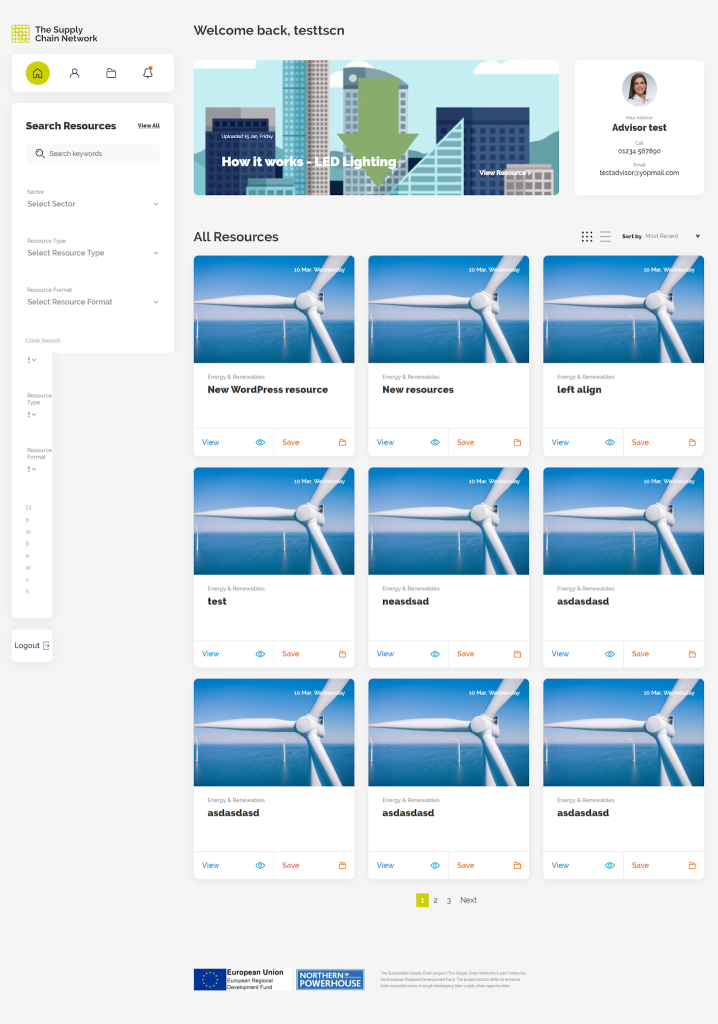
Our tool consolidates resources from various organizations, sectors, and categories into one searchable place. Users can navigate resources in a grid view, seeing important details like organization, sector, resource type, and date of publication.
Search & Filters
The system allows searching resources by keywords and tags and then refining search results by sector, resource type, and resource format. The sorting tool will help users find resources that meet their needs.
Key Benefits
-
Centralization of resources from different firms
-
Improved resource search and accessibility
-
Facilitation of category tracking and individualized alerts
-
Resource security with member verification
-
Facility for saving and reviewing resources
-
Multiple resource formats such as text, pictures, video, and documents
-
Streamlining of administrative tasks and member management
-
Organization of content by categories and filters
Key Features
Login & Forgot Password
Users can log in using administrator-provided credentials. Administrators have control over member creation and can share login credentials through email. The forgot password functionality allows users to recover access using their verified email address.
Welcome Page
After successful login, users are presented with a grid view of resources across different categories and organizations. Resource cards display information such as date, organization, sector, and resource type, along with options to view and save resources.
Resource Categories
Users can view the categories they are following along with relevant organization information and the number of new updates available. Users can also unfollow categories when required.
Resource Details
Users can view complete details of an individual resource, including text, images, attached documents, and videos. The page also provides options to submit ratings and reviews and displays similar resources.
User Account
Users can view and update their account information. The account section also provides access to followed categories and allows users to unfollow categories.
Search
Users can search for resources using relevant keywords or tags. The system displays matching resources based on the entered search criteria.
Resource Filtering
Users can refine resources based on Sector, Resource Type, and Resource Format, making it easier to locate specific information.
Resource Sorting
Users can sort available resources to improve content discovery and quickly identify relevant or recently added resources.
Save Resources
Users can save resources for easier access and reference at a later stage.
Ratings & Reviews
Users can provide ratings and reviews for resources, allowing them to share their feedback and experience with other users.
Administrator Member Management
Administrators can create and manage members and provide them with secure login credentials for accessing the platform.
Technology
| CMS / Platform | WordPress |
| Frontend | WordPress |
| Backend | PHP |
| Database | MySQL |
| Development Environment | Visual Studio Code |
| Architecture | Content Management System |
| Resource Management | WordPress CMS |
Business Results
30%
Faster Resource Discovery
Search, sorting, category navigation, and filtering features helped users locate relevant industry resources more efficiently.
35%
Improved Content Accessibility
Centralizing resources from different organizations and categories provided users with easier access to industry information from a single platform.
40%
Improved Resource Organization
Structured categories, sectors, resource types, and formats made it easier to organize and manage a large collection of industry resources.
25%
Reduced Administrative Effort
Centralized member and content management reduced manual administrative activities and simplified ongoing platform management.
Product Gallery
Planning a Similar Web Development Project?
Whether you’re building from scratch, modernizing an existing application, or expanding your engineering team, our experts are ready to help.
- 450+ Engineers
- 14+ Years
- Flexible Engagement
- US Business-Hour Collaboration
Frequently Asked Questions
It is an integrated web-based platform that enables users to discover, manage, save, and evaluate industry resources from different organizations and categories.
This platform has been designed for registered members requiring access to industry resources belonging to different sectors, organizations, and categories.
Yes. Users can search the resources by using keywords and tags.
Yes. The resources can be filtered based on their sector, type, and format.
Yes. Users can follow the relevant categories of resources and get notified about updates in those categories. Also, they can unfollow the categories at any point of time.
The platform supports resources in the form of text, images, attachments, and videos.
Yes. Users can save the resources for easy access.