


How to Convert Html to PDF in C#.NET Code?

PDF (Portable Document Format) is widely used file format developed by Adobe. Adobe want to develop file format which is not dependent of any hardware, software or operating system, to represent the document which include images and texts and PDF file format is invented. PDF displays same on Windows, Linux, Mac of any other operating system so, it’s preferred format to transfer information like legal and research work.
As a .net developer you encounter numerous occasions where you want to convert your one file format to another. Like if you are building one web application, which generate invoice and send to client. You cannot send directly your programming language file to client so; you generate HTML file. Now before sending to client you want to make it as PDF as you don’t want your client to change anything inside invoice. So, you require to generate HTML to PDF. This is just one scenario, there are plenty of another scenario for this.
We also have similar requirement for our customer relationship management software (CRM), which we use internally to manage leads, prospects, projects, payments and invoices. We have HTML template and we want to convert that to PDF, so, we have tried searching for various solutions. There are plenty of HTML to PDF solutions available including both free and paid. We specially want to integrate free solution because of you know cost constraint!
This are the few HTML to PDF tools we tried:
1. Headless Google Chrome
This is the simplest solution; we can open Google Chrome is headless mode and call it’s print to pdf function.

This works fantastic but there are few issues we are facing:
-
On server Google Chrome must be installed, this particularly caused issue in shared hosting as we don’t have control over server
-
Even if we have added –run-all-compositor-stages-before-draw flag, still some time it prints blank PDF
-
Application pool must run in LocalSystem account and this is issue on shared hosting environment
2. WkHtmlToPdf
This is one of the best and free HTML to PDF convertor tool. It is also Open Source and we love open source! So, we had given try to this. This software use library that uses Webkit engine to convert HTML pages to PDF. The problem is our CRM software is written in ASP.NET with C# and this library is written in C language and unfortunately, we don’t know how to do code in C language, oh no!
3. Pechkin
As we are evaluating WkHtmlToPdf, we encounter language issue so, we tried to find .NET wrapper for WkHtmlToPdf. There are many wrappers available but this one is quite straight forward and easy to use.
There are various Nuget packages available for Pechkin:
B. Pechkin
We choose to use Pechkin.Synchronized, as it’s thread safe wrapper and allows multiple thread to use wrapper, while working from just one thread.
We installed via NuGet package and the process was automatic.
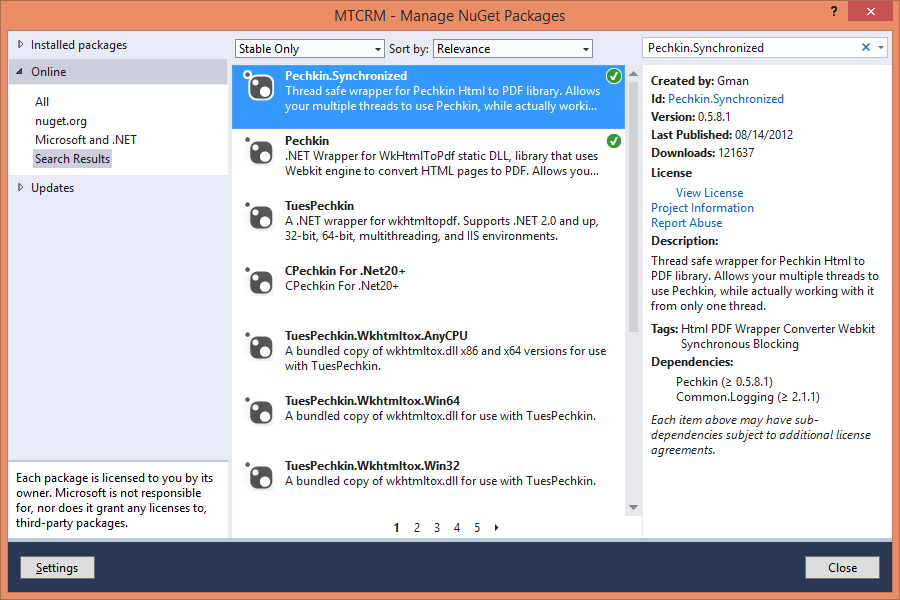
It’s installed and ready to use in no time!
Then we have done our invoice HTML file to PDF file conversation.
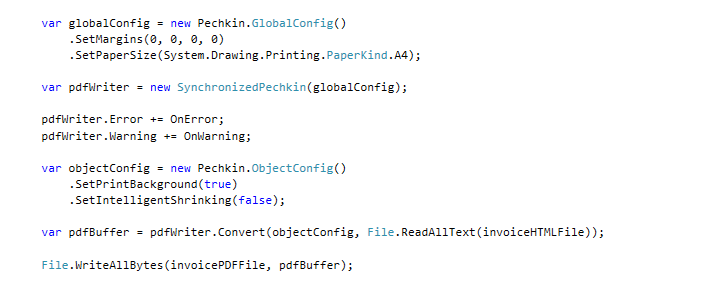
You need to add these two events for error or warning catching.
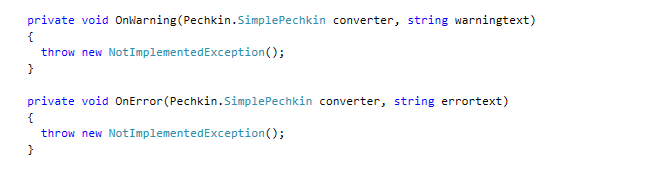
And it worked!
Hope this helps fellow programmers.
ManekTech is a software development company based in India. As Microsoft Gold Partner - .NET development agency, we help business to overcome complex business challenges via our innovative software solutions.
More articles on the topic
An app's user base using Firebase Analytics, a free and unlimited analytics solution. You'll be able to learn who your users are and how they interact with your app.
7 Min ReadFeb 27, 24

Nikhil Solanki
Mobile Lead at Manek Tech
Data Visualization technologies provide us with a proliferation of insights into the data obtained. Google and Microsoft, for instance, gather and utilize Big Data to shape the future of their commercial operations.
4 Min ReadFeb 29, 24

Ruchir Pandya
Delivery Head of Web at Manek Tech