


How to Build Android Apps with Kotlin Using MVP Architecture?

Introduction
The Model-View-Presenter pattern is basically work on separating the presentation layer from the logic. So, when Flutter app developers read the whole coding they read all the business logic of the screen in the presentation layer.
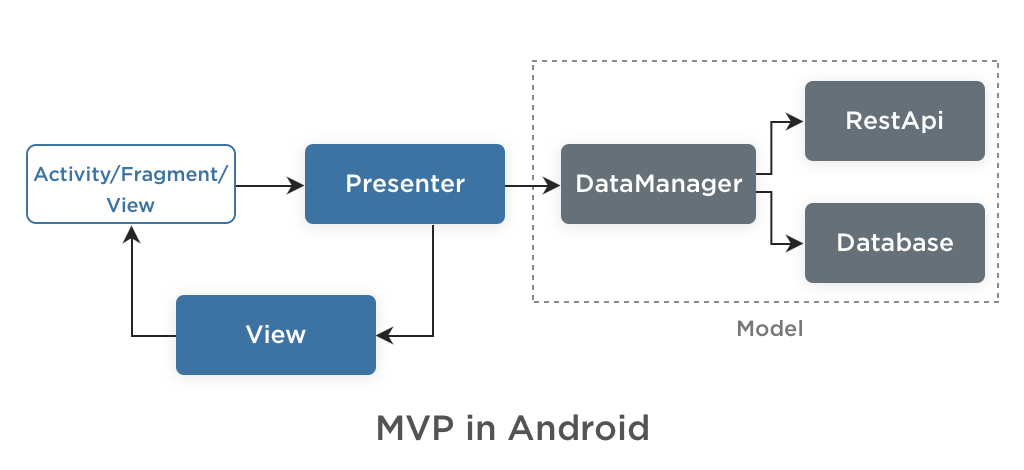
Understanding the Three Core Android Architectures
In android app development, there are mainly three architectures available for developing an app.
- MVC - Model-View-Controller is most commonly useful and also a very simple architecture pattern used by many developers for developing an app.
- MVP - Model-View-Presenter is quite different from the MVC architecture pattern, MVP uses the presenter for dividing the code and makes it readable for the developers.
- MVVM - Model-View-ViewModel is a pattern created to simplify the event driven programming of the user interface.
How MVP Works: Model, View & Presenter Explained
MVP is composed of the following three components:
Model - The model Contains a data provider and the code to fetch and update the data.
View - The View, usually implemented by Activity or Fragment classes, will contain a reference to the presenter. Views are updated or changed by the presenter. The presenter will call the method for updating the UI after getting the response and all interaction done using the interface action.
Presenter - The Presenter works as a middle man between View and Model. It retrieves data from the Model and passes it to the View. Also the main part is the presenter decides what happens when data passes to the View.
How to Implement MVP Architecture in Your Android Project (Step-by-Step Guide)
When we implement MVP Architecture in our project the main things behind:
- How to create a presentation layer?
- Where do we bind this layer in the activity or fragment lifecycle?
- Where do we unbind the presentation layer?
These three things keep running in the mind. So all the questions are solved when we start the implementation of the MVP architecture pattern.
1. Create a Class for a Presenter
First, you have to create a class for a presenter. After you have to attach this class in your activity lifecycle onCreate() method. See below sample code for how to bind your presenter from activity.
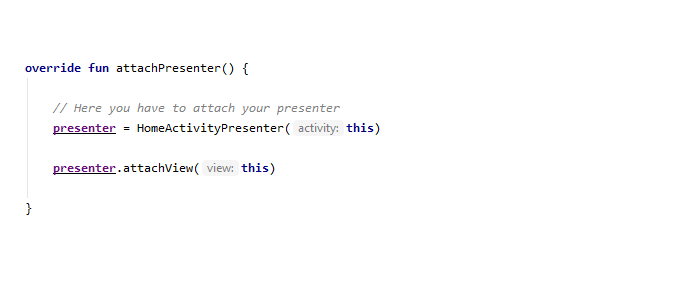
2. Unbind the Presenter
After this you have to unbind your presenter when your activity or fragment is destroyed. So you have to detach your presenter from the activity or fragment when onDestroy () lifecycle method is called.See below sample code for how to unbind your presenter from activity.
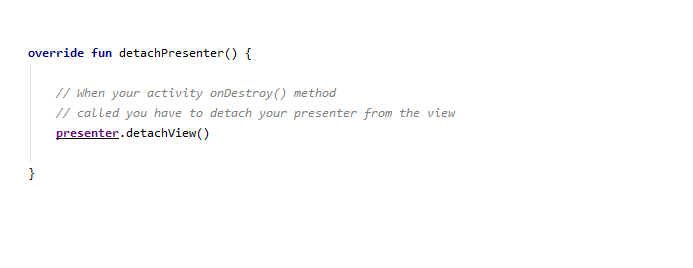
3. Presenter as the Bridge Between View and Model
Presenters act as the middle man between View and Model. From activity or fragment you have to call any method for retrieving data from api and also fetch data from database you have to call methods like below sample code.
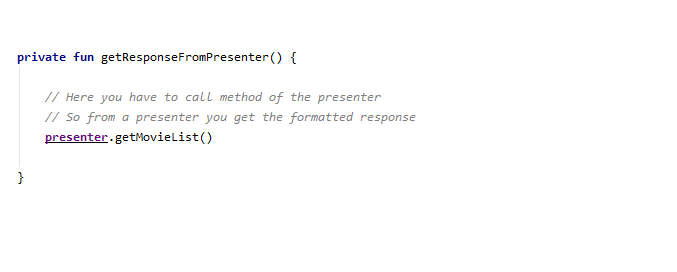
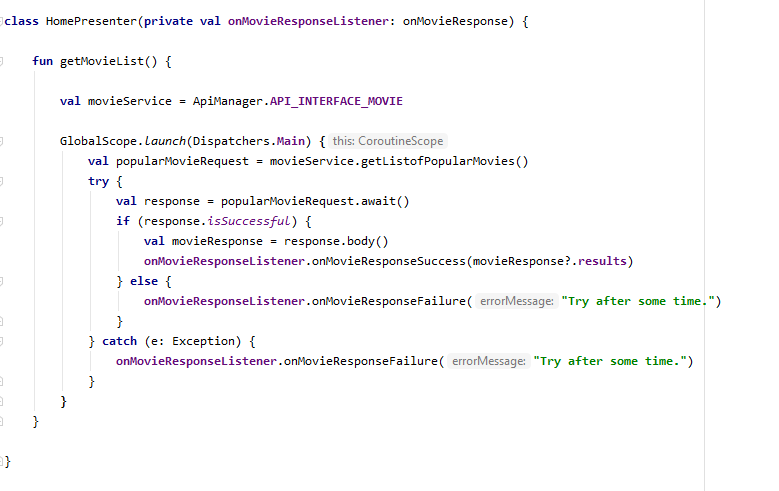
Now see how your presenter look like,
4. Presenter Methods for API Call, Parsing, and UI Updates
In a presenter we create the method for calling the api of the movie list. So here you can parse your response and all formatted responses pass to the view using the interface. Also you can see the onMovieResponseListner () interface. This interface we implement into the activity or fragment so we can get the response in the activity.
See below two methods we use for success and failure of the api response for updating the UI of the activity.
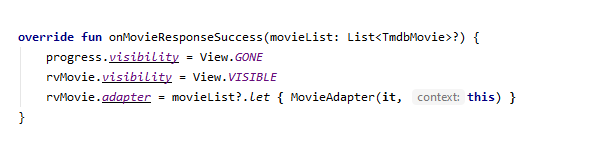
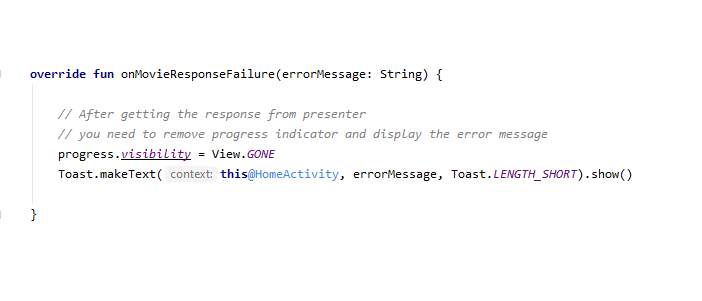
See we use two methods for interacting with the UI in activity. Where in one method we found the already formatted response and we only needed this response bind with the UI. Also we implement the onMovieResponseFailure() for informing users about the error.
Advantages of Using MVP Architecture in Mobile App
1. Clear Separation of Layers
MVP is very understandable and easier code maintenance because it separates the application’s model, view and presenter in layers.
2. Easy Readable Code
Using the MVP pattern, we maintain the entire application code in a consistent structure, making it more readable for developers. When it comes to testing, the code is already separated into different components, which makes it easier to test each part of the application individually.
3. Much Easier to Test Each Component in Isolation
Basically, when you follow this kind of architecture pattern for developing an app, your code is well-organized.
Kotlin is a simplified and universal programming language that concisely defines the simpler coding architecture. Manektech is an Android Application Development Company offering KAPT(Kotlin Annotation Processing Tool) and required solutions for your business needs. Putting our expertise and experience together, we aim to accomplish business objectives through a tailored and modernized development approach.
More articles on the topic
An app's user base using Firebase Analytics, a free and unlimited analytics solution. You'll be able to learn who your users are and how they interact with your app.
7 Min ReadFeb 27, 24
Nikhil Solanki
Mobile Lead at Manek Tech
Data Visualization technologies provide us with a proliferation of insights into the data obtained. Google and Microsoft, for instance, gather and utilize Big Data to shape the future of their commercial operations.
4 Min ReadFeb 29, 24

Ruchir Pandya
Delivery Head of Web at Manek Tech